We have prepare the login window to understand how to login in Nevino Lab Software.
* The Content stated above is for informational purpose only. Expert Software Team is not responsible if any part of content found meaningless in any manner or condition.
c. Enter the Password and click on the submit button.
We have prepared the video to understand how to Login in Nevino Lab Software. You can check it below
* The Content stated above is for informational purpose only. Expert Software Team is not responsible if any part of content found meaningless in any manner or condition.
Diagnostics Lab software which is having all necessary features required for lab. Lot of software are available in market but we found this one as best one. This software is easy to use and can be handled.
Diagnostic Lab common Work Flow
Doctor Prescribe the patient
Doctor may ask for the particular lab for test report
Patient go to lab
lab owner will see the prescription
he will take samples
lab candidate will take the payment and print the slip and provide it to patient
Lab owner will ask patient to come again for report
Patient will come again and will take the report
Patient then show the report to the doctor
Diagnostic Lab Software Features
How many patients visits lab for particular day
How many patients visits lab within date range
Daily collection report
pending balance report
Maintain complete history of patient
Can provide the preious report to patient any time.
How many patients has been referred by particular doctor.
Add any test at any time
All results Report will be generated with bold values
Test results which are not in normal range will come in bold
https://youtu.be/0_4oGd2f-GY
* The Content stated above is for informational purpose only. Expert Software Team is not responsible if any part of content found meaningless in any manner or condition.
If we are having and SSL certificate then we need to create SSL connection on web server. Let us activate SSL in opencart 1.5.6.1 . Opencart provides an admin interface to activate the SSL connection.
So Open Opencart admin panel by valid login credentials and let us do some settings on opencart admin interface.
You will get System menu in admin panel
Under system -> Click on settings tab
All Stores will be opened
Press edit link for specific store
Go to Server tab
Activate SSL
Now check your website and you may lose look of website as Secured website is trying to access multiple files which are not secured.
check your admin and you may lose admin panel look as Secured website is trying to access multiple files again which are not secured.
Lets make website part user friendly follow below steps
Now we need to edit files from hosted opencart folder.
Open Cpanel and login with valid credentials
Click on File Manager
Go to domain folder
Open Config file and change http to https( Before change please take the backup of original file )
Search for below line
define(‘HTTPS_SERVER’, ‘http://<yourdomain>/’);
and change it to
define(‘HTTPS_SERVER’, ‘https://<yourdomain>/’);
Save the config file
Lets make admin part user friendly now . Follow below steps
Now we need to edit admin folder files from hosted opencart folder.
Open Cpanel and login with valid credentials
Click on File Manager
Go to domain folder
Go to admin folder
Open Config file and change http to https ( Before change please take the backup of original file )
* The Content stated above is for informational purpose only. Expert Software Team is not responsible if any part of content found meaningless in any manner or condition.
When we open any website and we are getting “This site can’t be reached server DNS address could not be found error” then it can be because of following reasons
Case 1 : Domain name is incorrect
Solution is : Please check your spelling of domain and check again
Case 2 : ISP has blocked your domain ( Maximum time this is done when you are using STATIC IP )
Note : In this case your website is not running only on your LAN. Sometime ISP has blocked website due to number of reason so by doing following steps you can resolve this issue
Solution 1 :
If you are using dynamic wan ip. Just restart your modem. Your website may run.
Solution 2:
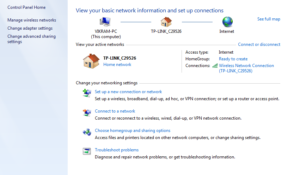
Step 1 : Open Network and Sharing center
Go to Adapter Settings
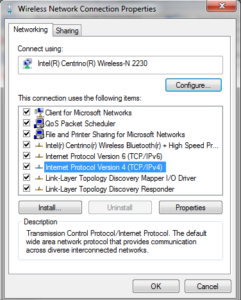
Go to properties of wireless activated connection by doing right click on it
wireless connection properties
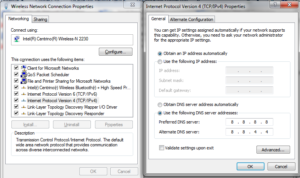
select the IP V4 properties
set DNS Server like below
how to change dns server
After setting this Press Okay to close internet protocol version 4 TCP IV4 Properties
Press Okay again to close wireless network connection properties
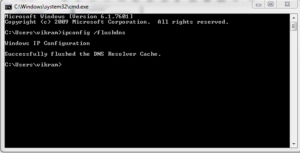
Step 2 : Open Command Prompt :
Type ipconfig /flushdns and press enter
flush dns cache using command prompt
Check your website : In our case site is running successfully
Case 3 : Hosting provider is not getting your request
Whenever we open any website. Then our ISP sends the request to our server and our request is not delivered to hosting provider due to number of reason. IN this case , you can trace complete route by firing “tracert domainname” on command prompt and check where request is broken.
Case 4 : Name Server is not set properly
Some time name server is not set properly. In this case, you need to change the dns from cpanel. If you dont have knowledge of technical things then you can contact your hosting provider or can take suggestion from IT team member.
Case 5: Server can be down
In this case you can contact to hosting provider telephonically or by mail as this issue can be resolved only from server end.
* The Content stated above is for informational purpose only. Expert Software Team is not responsible if any part of content found meaningless in any manner or condition.
We can find keyword ideas from multiple website. User can search keywords by following means
searching of that common words which are directly or indirectly link with your web page purpose
Common people use common lines to search on search engines
Today, there is always a competitor site in market. So user can get an idea of keywords by going through competitor website.
Multiple online tools are available for keyword search
You will find multiple websites which can guide about the keyword placement on web pages. Here you will get point to point answer of this
Keep keyword in title i.e. keep keyword in <title> tag
Keep keyword in meta description i.e. in <meta name=”description” > tag . Should not greater than 150 characters
Keep keyword in meta keyword i.e. in <meta name= “keyword”> tag. Can contain 30 to 40 words
Use heading for keywords i.e. use <h1>put keyword here </h1>
put keyword in <a> tags
put keywords in comments
put keywords in images alt property
put keywords in file name
put keywords in URL
use <meta name=”robots” > to avoid from SEO indexing
* The Content stated above is for informational purpose only. Expert Software Team is not responsible if any part of content found meaningless in any manner or condition.
File name for all the website must be simple and SEO friendly. As search engine give high importance to all file names for SEO.
Filename should be short and itself explainable .
File name must have minus symbol instead of underscore.
We must use few keywords in file name.
Do not use filenames such as single generic word. We must use complete name which is self explainable
File name should not be lengthy
File size must be less than 100 kilobytes
* The Content stated above is for informational purpose only. Expert Software Team is not responsible if any part of content found meaningless in any manner or condition.
All users must do valid SEO for their websites. As search engines can easily read the purpose of page. During SEO , user must take care of below points
User should keep perfect data in pages they should not keep relevent data on pages.
Website should follow complete SEO guidelines
Data should not be duplicate and data should not be copied from some sites
Website pages should have have same data which search engine indexing shows
Website page data should have some meaningful data as per the SEO guidelines. Some users just keep the SEO related data on pages to give good ranking which should not be done.
All web pages should be of good quality
Sometime user search data for particular keyword but they did not find useful content i.e. related to keyword content on web page which is totally against SEO guidlines.
Content should not be hidden as some users put some content hidden just to make the web page Search Engine friendly
Some user creates multiple website having same content which is against SEO guidlines
* The Content stated above is for informational purpose only. Expert Software Team is not responsible if any part of content found meaningless in any manner or condition.
There are multiple type of SEO. Here we will about the Off page SEO.
Off page SEO is not done on website directly. Its done in multiple ways. Some of list is as follow
Off page SEO is done by doing link building
By sharing web link with public by using multiple portals
Submitting link on multiple web directories
Submitting link on search engine
Search of local area website and post our web link for local areas
* The Content stated above is for informational purpose only. Expert Software Team is not responsible if any part of content found meaningless in any manner or condition.
On page SEO is defined on website itself. There can be multiple factor that where content needs to be put on web page.
In on page seo , all SEO related activies are done on web page source code. Below are the few things which we must take care for on page SEO
Title of page
Description of page
Tags Description
Keywords Description
Meta keywords and description
Internal Linking of web pages
Images tags
* The Content stated above is for informational purpose only. Expert Software Team is not responsible if any part of content found meaningless in any manner or condition.